
For years, one of the nicest maps on the web looked hand-painted: Stamen’s Watercolor tiles, OpenStreetMap rendered with paper texture, soft washes and frayed edges. WaterColorMap is my attempt to rebuild that look in Go, from raw OpenStreetMap data. It is a work in progress. The tiles come out and fit together, but there is no map yet that you could simply visit. This is where it stands, painted over Hanover, the city all its tests are run against.
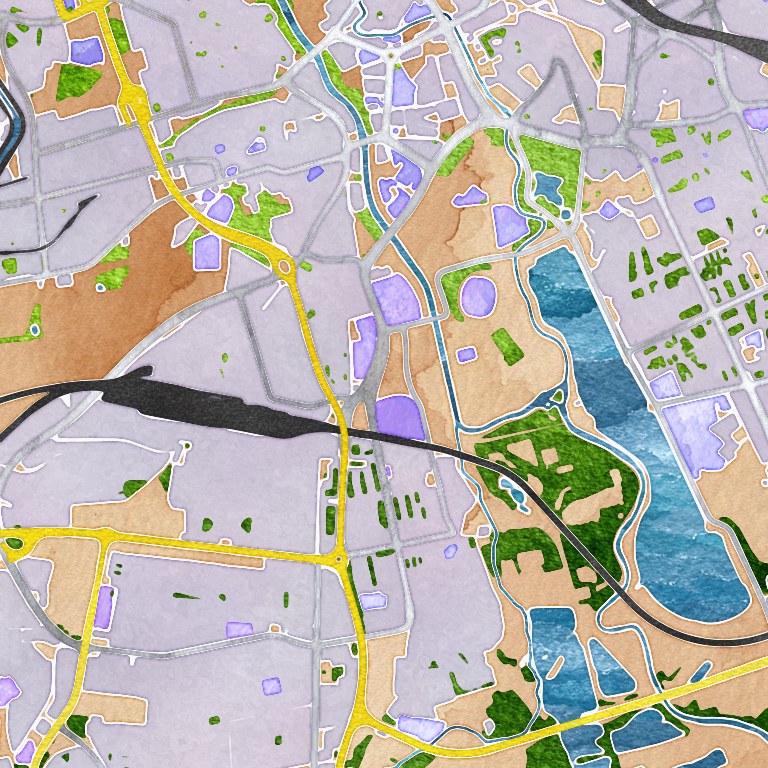
Linden, close up
Linden-Mitte is the top middle of the map above: a dense grid of old streets just west of the Ihme. One zoom level further in, the blocks get their own outlines, and the brush becomes visible: every edge is a little uneven, every area a little blotchy, as if the paint had run.
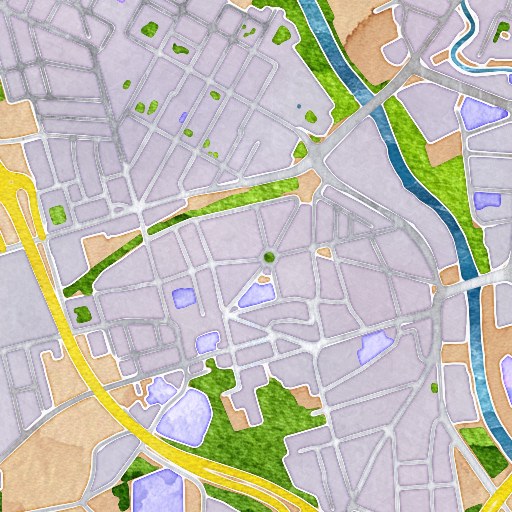
Brush strokes from a mask
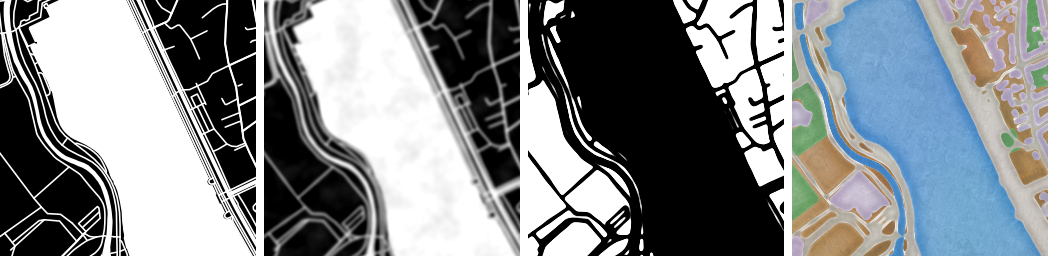
None of it is painted, of course. Stamen described their process years ago, and WaterColorMap follows it. Mapnik first renders each kind of feature, water, roads, parks, buildings and so on, as a clean black-and-white mask. Everything that should cut a hole into the land is merged into one mask. That mask is blurred, a Perlin noise field is added on top, and a threshold turns the result back into hard black and white. The noise is what makes the edges fray: where it pushes the blurred grey over the threshold, the shape grows a little; where it pulls it under, the shape gets a bite taken out. Inverted, that is the land. A tileable watercolor texture is then cut out with each layer’s mask, and the layers are stacked.
The hard part is that a web map is cut into tiles of 256 × 256 pixels, rendered independently, and the frayed edges must still meet at the borders. So the noise is not generated per tile: every tile samples the same global noise field at its own position, and the textures are aligned to the world, not to the tile. Each tile is also painted 64 pixels larger on every side and then cropped, so the blur sees what lies beyond its edge. In the Linden map above, you should not be able to find where one tile ends.
Faster, where it did not matter
The first version was put together in about a week. Returning to it, I spent most of the time on the parts that a single nice-looking tile hides. A good share went into performance: buffers that are reused instead of allocated, direct pixel access, an AVX2 kernel for the soft edges, layers painted in parallel. Painting one tile now takes about 26 instead of 36 milliseconds, and a test caps its allocations and memory, so they cannot quietly grow back.
Then the measurements put that into perspective. A full tile takes seconds, not milliseconds, and about 71% of it is spent waiting for the Overpass API to return the OpenStreetMap data. All the painting optimisation touched one or two percent of a batch run. I saw the same when rendering the pictures for this post: the nine tiles of the overview took a few minutes, one Overpass request timed out on the way, and for the close-up the public server soon began refusing connections and had to be waited out.
That shapes what is realistic. At the measured rate of roughly 0.3 tiles per second, Lower Saxony down to zoom 14 is about 60,000 tiles and two days of rendering; Germany is 317,618 tiles, 38 GB and about twelve days. The whole world down to zoom 12 would take years on one machine. So the plan is tiers: the world at low zoom from generalised Natural Earth data, which needs no Overpass at all; regions in detail from a local Overpass instance; and the rest rendered on demand by the built-in tile server when someone looks at it.
What works, and what does not yet
What works: single tiles and batches by bounding box and zoom range, folder or MBTiles output, resuming interrupted runs, the open sea and coastlines from separate water polygons, a tile server with caching and on-demand rendering, and a stamp on each tile that records which OpenStreetMap data it was painted from, so stale tiles can be found and re-rendered.
What is still open: there is no public tile set yet, so no map to click through. Tiles are PNG or lossless WebP; lossy WebP would make them about nine times smaller, but every lossy encoder for Go needs C, which the rest of the project avoids. Re-rendering only what changed in OpenStreetMap is designed but not built. And the same textures are used at every zoom level, where the overview would want coarser paper and the close-up finer detail.
Trying it
It runs on Linux with Mapnik installed, or in the Docker image the repository builds. A small batch over Linden at zoom 14 looks like this, and serve shows the tiles in a Leaflet demo:
./bin/watercolormap generate --bbox "9.695,52.345,9.745,52.375" \
  --zoom-min 14 --zoom-max 14 --allow-failures
./bin/watercolormap serve --addr 127.0.0.1:8080
The README has the setup. Please go easy on the public Overpass server; for anything larger than a district, the repository describes how to run your own.