
My Huawei MateBook has a fingerprint reader, a Goodix 27c6:5120. No Linux distribution supports it, so on Ubuntu it was just a button. Now it unlocks sudo and the login screen with a finger, through a libfprint driver I wrote for it: goodix-5120-linux. Getting there involved a dead keyboard, a key hidden in Windows, and a sensor too small for ordinary fingerprint matching.
Four commands, no keyboard
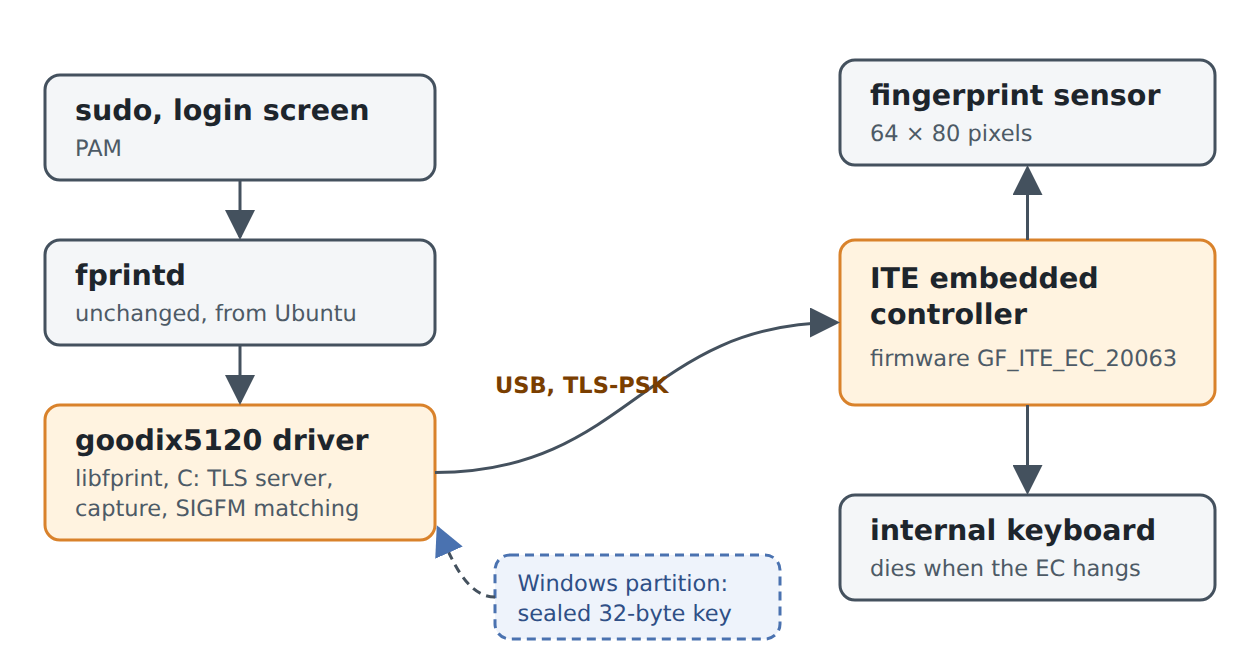
The sensor is not a USB device of its own. It hangs off the laptop’s ITE embedded controller (EC), which also scans the internal keyboard and looks to Linux like a USB serial port. The open-source goodix-fp-dump project describes the protocol of this sensor family, so my first probe sent four harmless-looking commands from it: a no-op, the firmware version, a calibration read and a key read. All four answered with valid checksums. Then the keyboard stopped working.
Linux noticed nothing. No USB error, no kernel message; the EC had simply stopped sending keystrokes. A reboot did not help. Bisecting the probe found the culprit: the key read, sent with an empty argument where the Windows driver always sends eight bytes. That froze the EC’s firmware, keyboard included. Finding a reset took longer still. The one that works on this machine is to shut down, leave the charger plugged in and hold the power button for 40 seconds.
Everything since goes through a single send gate. It refuses any command the driver does not know and any payload whose length differs from what the Windows driver sends. The commands that write firmware or the key are not in the driver at all. The coding agents I worked with never touched the device either: they built and tested against a fake EC in software, and I ran every live test myself.
The key lives in Windows
Beyond the first few commands, the EC only talks over TLS with a pre-shared key, 32 random bytes that the Windows driver wrote into the reader when it set it up. Windows keeps its copy sealed with DPAPI. The repository’s goodix-dpapi tool unseals it offline from the Windows partition, mounted read-only, so Windows Hello keeps working. The flip side: without the Windows installation that set up the reader, there is no key, and writing a new one would overwrite Windows’.
The key was right, but the handshake still took a while. Its first attempt stalled halfway and left the EC stuck again. Once the Go prototype got through, the C driver inside libfprint did not: the EC answered it with a TLS error. What finally helped was timing. The EC does not like the host’s TLS records arriving back to back, so the driver now leaves a gap between them, as the Windows driver does.
Too small for minutiae
An image from the sensor is 64 × 80 pixels, a patch of skin only a few millimetres across. libfprint’s usual matcher compares minutiae, the points where ridges end or split, and needs at least ten of them per image. These images have one to five. No amount of scaling changed that; there just is not more finger in the picture.
The way out came from the community’s fork for similar small Goodix sensors: SIGFM, which matches images by their texture features instead. Enrolling takes 15 touches, each placed a little differently, so the template covers more of the finger than one image can. In tests, the enrolled finger scored from 36 up to over 250,000, other fingers never more than 9, against an acceptance threshold of 24.
Using it
No package gets replaced. An install script copies the patched libfprint to /opt and adds a systemd drop-in that makes Ubuntu’s own fprintd load it. From there it is the normal Linux setup:
sudo ./goodix5120-fprintd.sh install psk.bin
fprintd-enroll -f right-index-finger
sudo pam-auth-update --enable fprintd
Opening the reader, handshake included, takes about half a second, and the match comes about a tenth of a second after the finger lands, before it lifts. The one fix outside the driver was GNOME’s lock screen: it runs a password and a fingerprint login side by side, and with fprintd in both they fought over the reader, so the password prompt hung for ten seconds. The installer now keeps fprintd out of the password one.
Trying it
This is a driver for one laptop: the MateBook HVY-WXX9 with EC firmware GF_ITE_EC_20063, which the driver checks for. Two calibration values are still those of my unit, so another one may need its own. You also need the Windows installation that set up the reader, for the key. If that describes your machine, the README has the steps; just bundle builds the library in Docker.