
The visualizer video for Moonchild’s “The Other Side” caught me the first time I saw it: calm music, and a scene just as calm, a boat on a night sea under an aurora. I was deep into Shadertoy back then, so I tried to rebuild that scene from techniques I picked up in other shaders. It got somewhere, but never to a state I wanted to publish.
AI-assisted development got me past the point where I had given up, and I could finally finish what I had in mind for that shader. The workflow was fun enough that I went straight on to a second one: an animated version of “imperfection”, an image I once made with generative AI.
Both are GLSL scenes in Shadertoy form. the-other-side is a night sea: a starry sky, two aurora ribbons low over the horizon, and an empty rowing boat riding the swells. imperfection recreates the abstract painting, a warm yellow and red glow that breaks up into brush blocks and streaks and fades into dark blue, and keeps its paint flowing. Both run in the browser with WebGL2: the night sea and the painting.
The other side: a night sea in layers
-D METEOR_FORCE=1); normally they are rarer.The scene is a stack of layers, each in its own include file. The sky gradient is calibrated against a reference image of the visualizer: a saturated blue-teal zenith, a greyer cyan haze near the horizon, and brightest a little right of centre, under the aurora. The stars are cell-hashed points drawn as small Gaussians whose width never drops below a pixel, so they don’t flicker under the slow camera drift. Occasional meteors cross from right to left on paths fixed to the sky.
The aurora is the one part I didn’t write: it is derived from “Auroras” by nimitz and keeps its licence (CC BY-NC-SA 3.0). The rainbow palette became a cyan-green to teal ramp, and the volume density is multiplied by a band mask, so instead of filling the whole sky the aurora reads as two broad arcs that meet the horizon. It is ray-marched with 40 steps in the sky and 12 in the reflections on the water.
The sea is not ray-marched at all. It is an analytic hit on a plane, with long swells and stretched noise ripples whose slopes are computed analytically. Every component is filtered against the pixel footprint, so the detail fades out toward the horizon instead of aliasing. The slope variance that gets filtered away is kept as roughness: at grazing angles only the facets tilted toward the viewer are visible, so the water is a bit darker than the sky right above it, and the horizon stays a crisp line. The boat is the only real 3D object: a small distance field, sphere-traced inside its bounding box, with rowlocks and two oars resting in them. It samples the swell height under bow, stern and both sides to heave, pitch and roll, and it is cut off at the true swell height, so its waterline moves with the passing swells although the sea is drawn flat.
The scene renders into a half-float buffer, and a second pass blends in a soft glow built from that buffer’s mip chain, like the veiling glare of a lens, before it tonemaps. On an Intel Iris Xe the whole scene takes about 10 ms per frame at 1280×720 and 22.5 ms at 1920×1080.
A sea that loops
For a square Instagram clip, -D LOOP=30 makes the scene repeat exactly every 30 seconds. Oscillations such as the swells, the camera bob and the aurora waves are adjusted to turn a whole number of cycles per loop, which changes their speed by a few percent. Drifting noise can’t be adjusted that way, so it is sampled at t and at t minus the loop length and cross-faded over the loop: it moves at its usual speed and is back at the start when the loop closes. Even the meteors wrap: one that crosses the loop point continues after it.
Letting the model look at its own output
Both scenes come with a small Go runner (go-gl and GLFW) instead of living in a browser tab. For me it is a window that reloads whenever an include file changes. For the coding agent it was more important: it can render a deterministic screenshot at any time, one layer in isolation (-D VIEW=2 shows only the aurora), a side-by-side comparison with a reference, or a frame sequence for a contact sheet. That closes the loop the agent needs: change the code, run Go, grab the screenshot, look at it, and go back to the start if it isn’t right yet. Without it, every iteration would have needed a browser. The same runner bundles the include files into one file per Shadertoy tab, and the GitHub Pages workflow serves that bundle with a small WebGL2 player.
imperfection: a painting that keeps flowing
The second scene started from an image, not from a scene: a warm column rising to the top left, a red band running to the right edge, an ice-blue column of drips beside the yellow core, and everything else cool and dark. The goal was not a pixel copy but something that reads as the same painting, and then to make its paint move without moving the composition.
Reading the image first
Before any shader code, the image was taken apart in docs/analysis.md: composition, colours, directions and building blocks, with the measured numbers next to them. A few observations shaped everything after:
- Warm and cool never mix into grey. The transitions are hard: blocks overlap, or streaks of both colours interleave. Interpolating from orange to blue passes through mud, so the shader must never do it. Even the darks are split: blue-black in the cool half, red-black in the warm half, no neutral black.
- The texture is anisotropic everywhere. There is almost no isotropic noise, so plain value noise or fbm looks wrong unless it is stretched hard along one axis.
- Three stroke directions: vertical drips and pixel-sort streaks dominate, then diagonal hatching at about 35–50°, then horizontal grain inside some blocks. Every rectangle edge is axis-aligned.
Scoring a painting
For the night sea, judging by eye against the visualizer was enough. For the painting, “looks about right” wasn’t enough to decide between approaches, so the repository has imgstat, a stdlib-only tool that compares a render with the reference by style and composition rather than pixel by pixel. It combines eight components: colour differences of 16×16 and 32×32 downsampled images in OKLab (col16, col32), two palette distances (palH, palW), the stroke direction per cell and overall from a structure tensor (dirC, dirH), and the strength and direction of the fine brush texture (texE, texA). Each is normalised so that the reference scores 0 against itself and a flat image in its mean colour about 1. The mirrored reference scores 0.61: same palette and texture, everything on the wrong side. For the coding agent this turned “does it look right?” into a number it could check after every change, next to the screenshot.
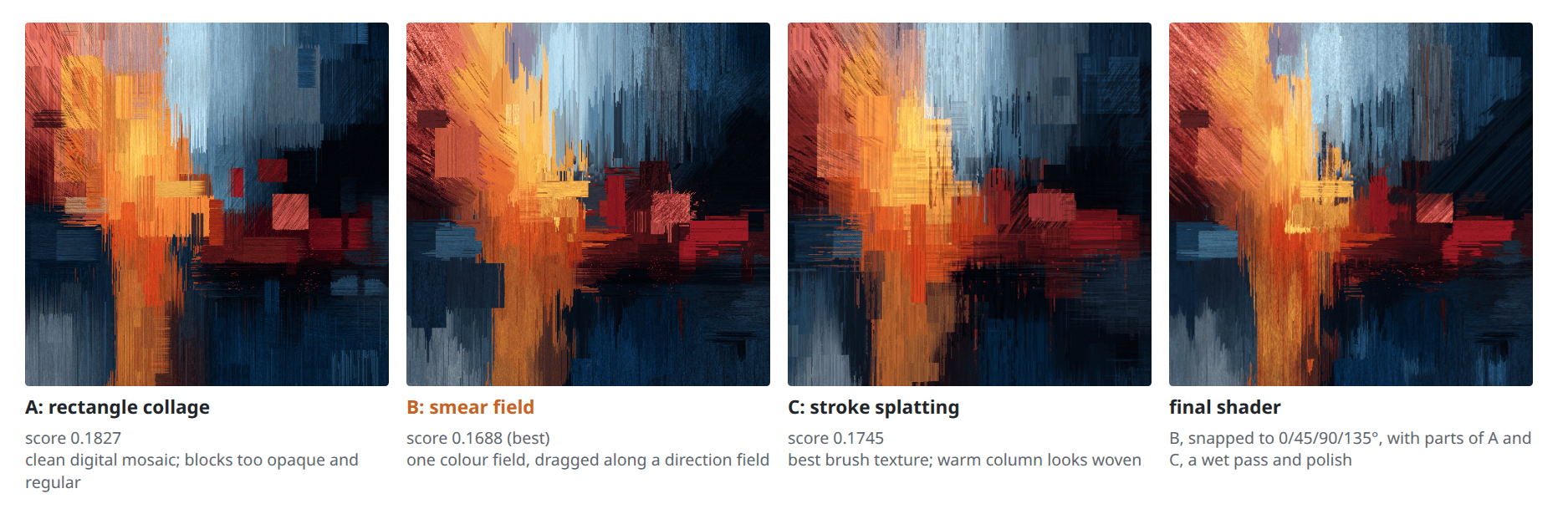
With that, three rival shaders were prototyped from the analysis: a collage of jittered rectangle grids (A), a smear field that drags one coherent colour field along a direction field, in effect a procedural pixel sort (B), and classic brush-stroke splatting (C).
imgstat distances to the reference (lower is better).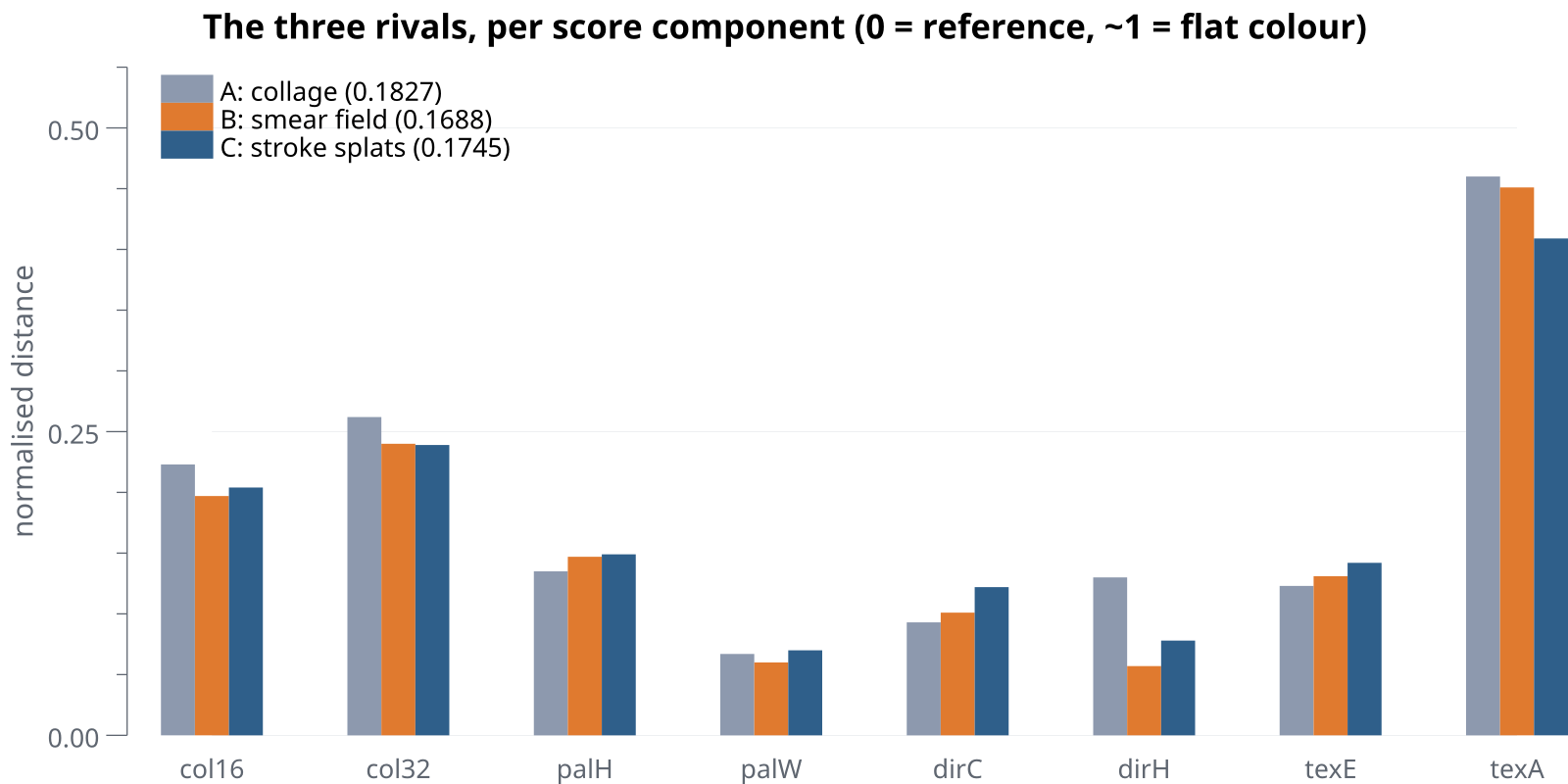
docs/analysis.md. The total is a weighted mean (col16 0.20, col32 and dirC 0.15, texE 0.12, palH, palW and dirH 0.10, texA 0.08).The totals are close: 0.1827, 0.1688 and 0.1745. B is clearly ahead only in the global direction histogram (0.057 against 0.130 and 0.078), and C has the best brush texture anisotropy (0.409). The gap between B and C is about as large as the metric’s noise, so the eye decided. A read like a clean digital mosaic. C had convincing ink scratches, but its warm column looked woven. B had the most painterly gesture, a fanned hatch at the top left, ice drips with pointed tips, paint dragged from the column into the band, and all of it from smearing one field, which keeps the colours consistent. B became the base, with the stroke texture and seam ink scratches from C and the frayed wedge and soot strip from A merged in.
One colour field, dragged around
The idea behind B carries the final shader: there is exactly one colour source, a hand-authored field that follows the cross composition. All structure, blocks, drips, hatching and grain, comes from distorting the lookup into that field. The smear drags the lookup along a direction field, so a pixel shows the colour from further up its drip. A block collapses the lookup to a single field point, so it gets one flat colour that still belongs to its surroundings. Every direction is one of 0°, 45°, 90° or 135°.
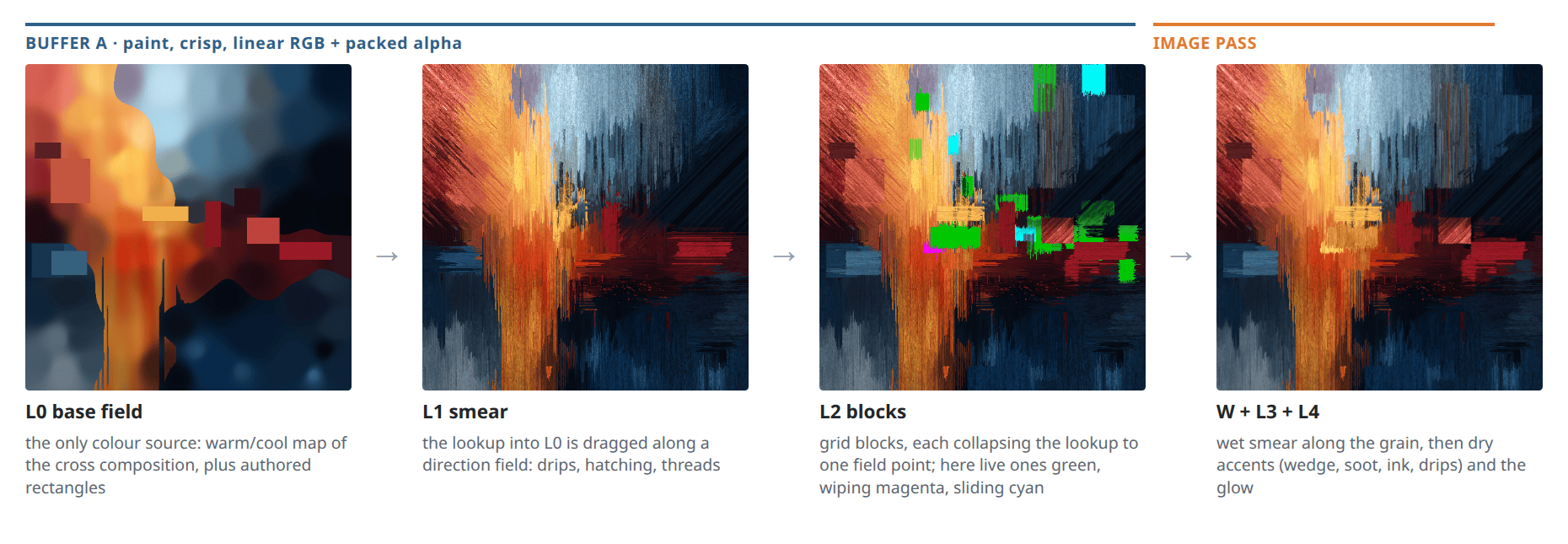
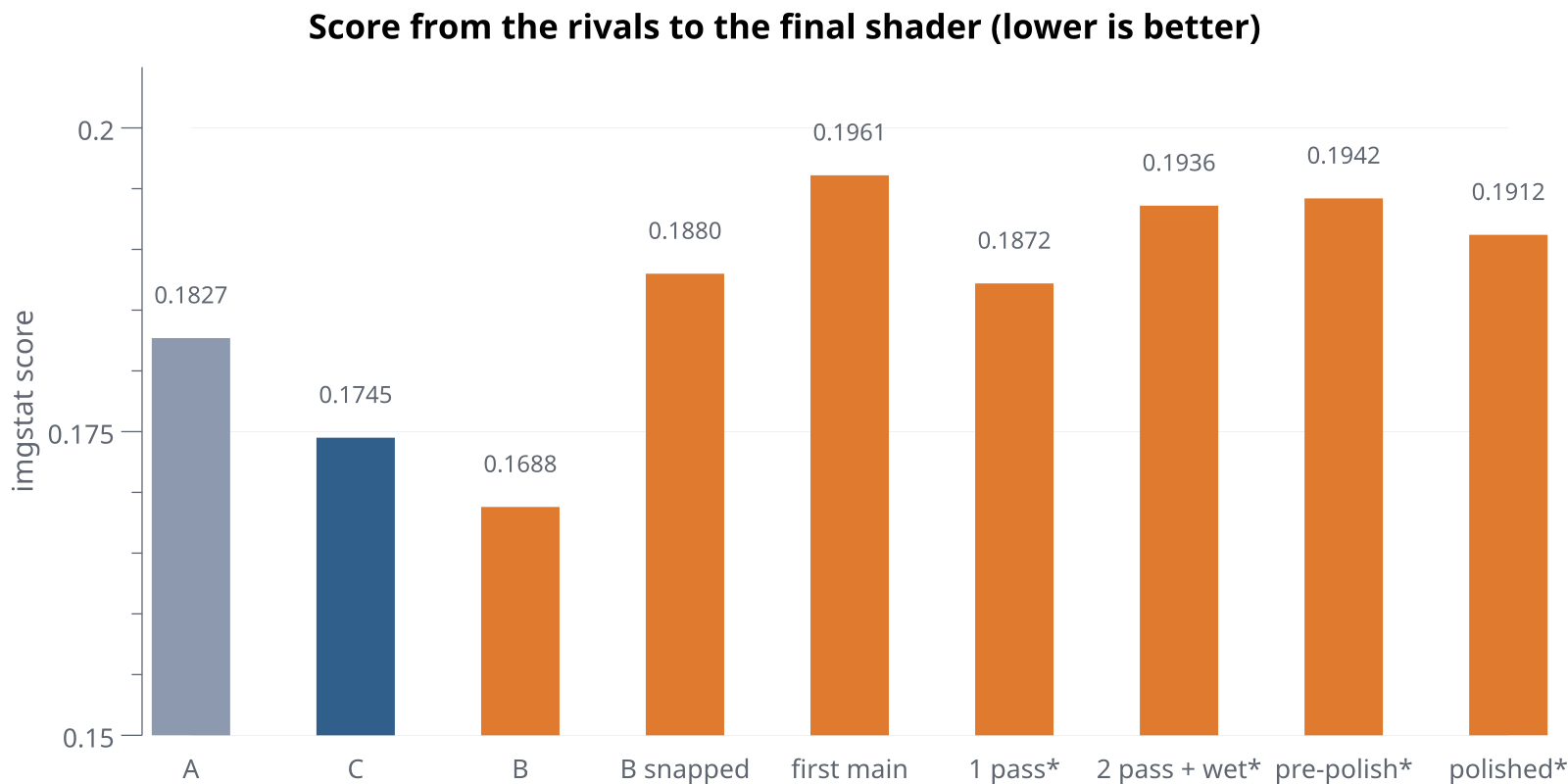
SHOW_FIELD, NO_BLOCKS, BLOCK_DEBUG). The middle two panels already have the dark accents of the Image pass on top.That restriction to four angles was a deliberate choice, and the score shows what it cost. The reference’s diagonals spread over 46–66° and 118–150°, so snapping B’s strokes to 45° and 135° alone raised its score from 0.1688 to 0.1880. That is the fair baseline for everything after. The first full version scored 0.1961, worse again, but with thin hatching lines instead of wide planks, glaze bars and drips at the bottom left, which looked clearly better. From then on the metric was a check, not a judge: changes that cost a little on the score but looked clearly better stayed. The wet pass below is the biggest of them.
Wet paint
The single-pass version looked pixel hard: crisp 1 px grit and binary pixel edges everywhere, where the painting has wet, blended runs next to a few dry marks. The fix was a second pass. The first pass paints crisp, and its alpha channel packs three facts per pixel into one integer: the grain direction of the topmost paint, the kind of paint (background, grid block, hero block, glaze) and a wetness from 0 to 1, as dir + 4·kind + 16·round(63·wet). That stays at most 1023, which a half float holds exactly. So the second pass knows each pixel’s true grain without recomputing the direction field.
The wet pass then takes 12 bilinear taps along the grain, 72 % of them upstream because paint is dragged downstream, over a run of 4 to 40 reference pixels times the wetness. The taps are weighted by how similar they are to the centre pixel, and taps of the other colour family are dropped entirely, except within 2 px, where that is anti-aliasing. That is the rule from the analysis again: warm and cool never blend into grey, strong edges survive, small grit melts. A true line integral convolution that follows the grain at every tap rendered practically the same image (mean absolute difference 2e-5) and cost about 0.9 ms more, so the simpler version stayed.
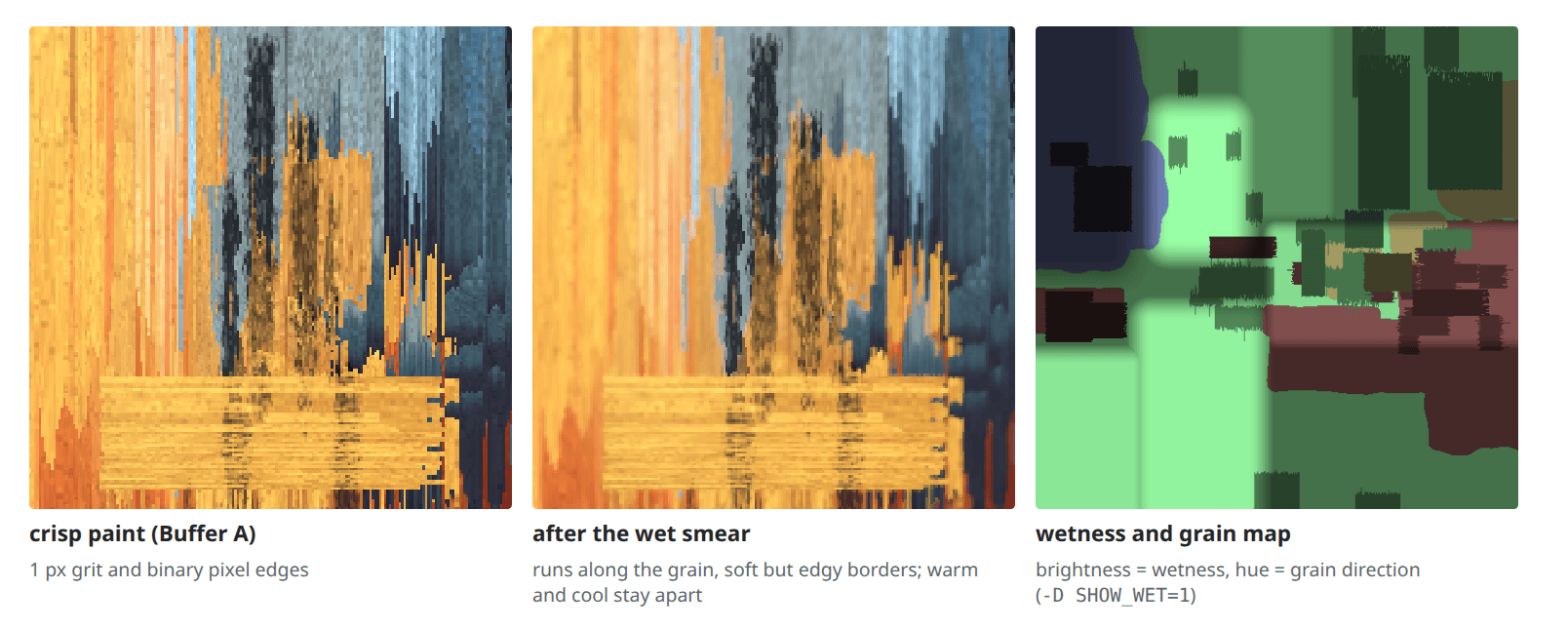
The score didn’t like it: +0.006. The fine texture energy got better (0.139 to 0.125), because the excess grit melted, but the anisotropy got worse, since a directional blur sharpens whatever direction a cell already has. It stayed anyway, because it is what makes the image read as paint. At 1024×1024 on an Intel Iris Xe the paint pass takes about 9.4–9.7 ms and the wet pass with accents and grade about 2.35 ms.
Motion on a fixed composition
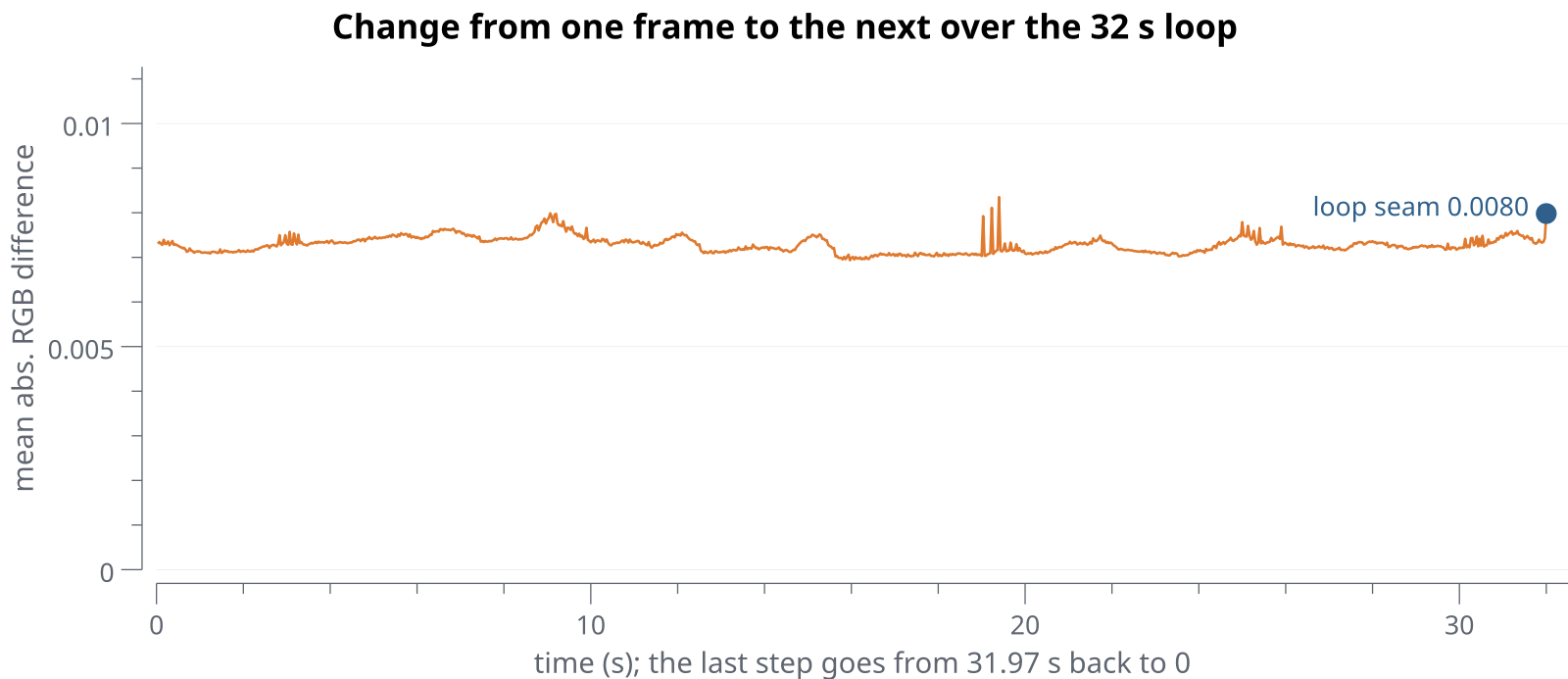
The animation follows one rule: the painting is alive, but its composition is fixed. Drips run downward at different speeds, smears in the band drag to the right, grid blocks wipe in along their grain, hold and wipe out again, the dark wedge’s strokes slide along their lanes, and the yellow core flickers like a low fire, all along the same four angles. Nothing reads raw time: every layer takes it from one clock with a fixed 32 s loop, scrolling a whole number of pattern periods per loop or drawing a new event per time slot. The frames at 0 and 32 s are identical, and -D ANIM=0 freezes everything.
The analysis doesn’t pretend it is done: the ice column is still more streaky than in the reference, and the lower warm column more uniform orange than the reference’s patchwork. But it reads as the painting, and the paint keeps flowing.
Trying it
The browser versions need WebGL2 (Space pauses, F toggles fullscreen, ?t=20 sets the start time): the-other-side and imperfection. The runner needs Go and OpenGL 4.1:
git clone https://github.com/CWBudde/the-other-side && cd the-other-side
go run . -D VIEW=2              # window with hot reload, aurora only
go run . -shot out/shot.png -time 12
go run . -bundle out/shadertoy.glsl
The READMEs list the layer views and tunables, and imperfection’s docs/analysis.md has the full scoring tables.